

Routine 01 · Deep Cleaning
Free up space for things you truly need
Sweeps 14+ system junk categories, uncovers hidden browser AI caches (Chrome 4+ GB), and vacuums heavy media from Telegram, Discord, and Slack.
Explore CleaningMemory, caches, disk space, malware — all handled from the menu bar. Try every tool free for 7 days, then $4.99/month.
Paid cleaners split the job into separate modules and charge a subscription. DrMaco puts deep cleaning, protection, live insights, app tidying and disk decluttering into one smooth flow — and keeps it free.
Sweeps 14+ system junk categories, uncovers hidden browser AI caches (Chrome 4+ GB), and vacuums heavy media from Telegram, Discord, and Slack.
Explore Cleaning
Round-the-clock watch for ransomware, a hunt for software that keeps reinstalling itself, a cleanup of permissions apps no longer need, and an alert the moment anything reaches for your camera or microphone.
Explore Guard Ultra
See which cores are working and which are resting, how much memory is being squeezed, how much graphics memory a render is eating, and force-quit anything that has frozen — or wake sluggish apps back up without closing them.
Explore Performance
Safe background process termination, orphaned leftover hunting across ~/Library, complete Factory App Reset, and unused .lproj language stripping.
Explore Apps Suite
An interactive sunburst map of your whole disk, a dedicated zone for local AI models (Ollama, LM Studio), an exact duplicate finder, and a 7-pass shredder for anything that must never come back.
Explore Space LensSet it up once and DrMaco stays out of your way.
One Homebrew command, or grab the installer directly. No account, no sign-up, nothing to configure first.
Confirm once with your password. From then on it can do exactly two things — and nothing else.
Set a free-RAM threshold and DrMaco handles the rest, posting a notification whenever it acts.
brew install drmacoNarrow & named Active · below 15% free RAM
Over 35 focused tools: free up memory, win back disk space and keep malware off your Mac.
Comprehensive composite scan: flushes inactive RAM, deep cleans caches, halts hung apps, wipes trash, and sweeps privacy traces in one smooth operation.
Reclaim used RAM in one click. Auto-purge can watch free memory and act on its own below your threshold.
Shows how much memory your Mac is squeezing instead of slowing down — the ratio (say 8.5×) and the gigabytes it saves you right now.
Protects 30+ critical and developer apps (Claude, IDEs, Termius, Docker, terminal sessions, listening ports) so they are never terminated during memory sweeps.
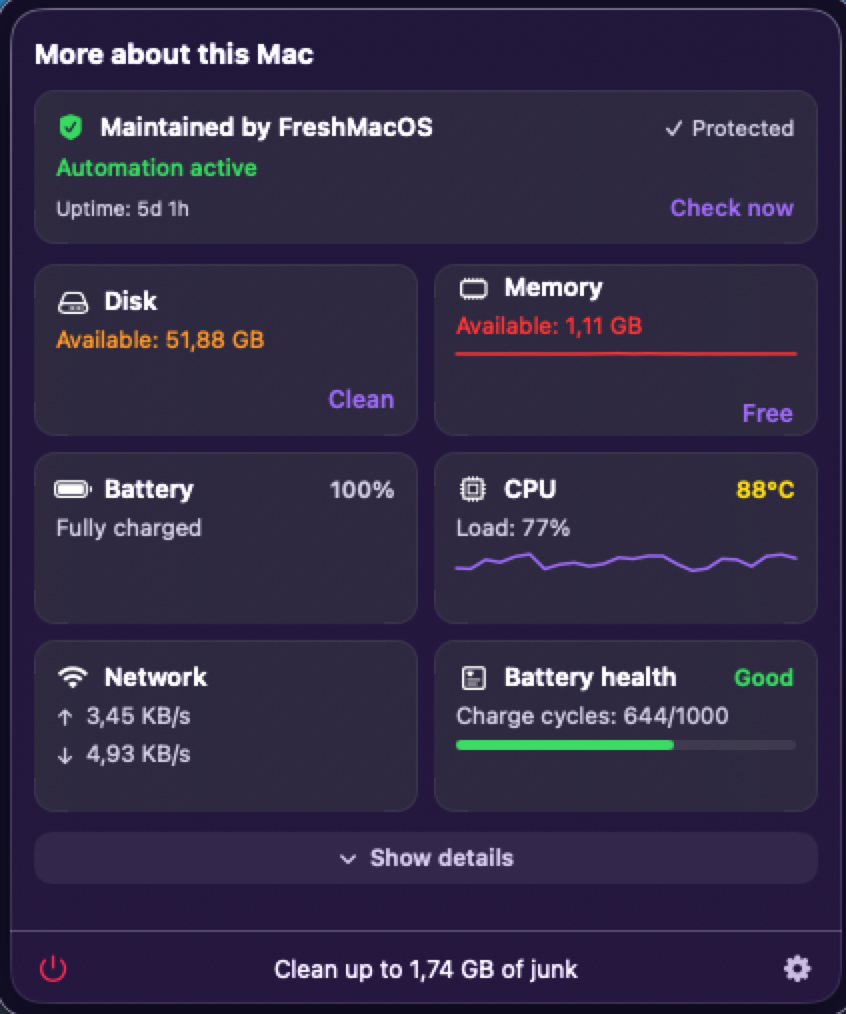
Disk, RAM, battery and CPU at a glance, each with rolling sparkline history.
Spots the app that keeps growing and never gives memory back — and warns you long before your Mac freezes.
Wakes up sluggish background helpers and browser processes so they hand back the memory they've been hoarding — without closing anything you're working in.
DaisyDisk-grade visual interactive disk hierarchy with a dedicated zone for local AI models (Ollama, LM Studio, Hugging Face) and Docker containers.
Clears user caches, logs older than three days and stray .DS_Store files. No admin rights needed.
High-speed duplicate finder utilizing a 16KB prefix-hash saving 95% disk I/O, with 1-click smart auto-selection to keep newest or oldest files.
Detects visual series, burst shots, and multilingual screenshot sequences across your library with side-by-side comparison.
Irreversible cryptographic file obliteration adhering to US Department of Defense 5220.22-M (3-pass & 7-pass) and Gutmann 35-pass standards.
Sweeps gigabytes of voice messages and media from Telegram, WhatsApp, Signal, Slack, and Discord, plus structured desktop cleanup.
That's why emptying the Trash frees nothing: Time Machine quietly keeps copies of deleted files on your disk. This finds them and lets them go.
Empties the Trash in one click — exactly what you'd do by hand, minus the clicking.
Watches for the tell-tale burst of files being encrypted or renamed en masse, and raises the alarm before your documents are locked.
Audits privacy permissions and identifies applications that have not been opened in months yet retain access to Camera, Mic, Accessibility, or Disk.
Scans apps, downloads and login items against a local threat-pattern database — entirely on your Mac, nothing uploaded anywhere.
Flags malicious browser extensions and rogue configuration profiles installed without your knowledge.
Finds adware and other unwanted software hiding in your Mac's startup items, then removes it in one click.
Full control over what starts with your Mac, including the leftovers from apps you deleted long ago — the reason boot times creep up over the years.
Recovers tens of gigabytes by scanning and safe-cleaning abandoned node_modules, Xcode DerivedData, .venv, target/, and Gradle caches.
Safely terminates running processes before removal, wipes orphaned leftovers in ~/Library, and supports complete Factory App Reset.
Deep-scans Application Support, Preferences, and SavedState to eradicate ghost files left behind by apps uninstalled weeks or months ago.
Audits Safari extensions, system preference panes (.prefPane), QuickLook generators, and Spotlight plugins in one unified command center.
Apple Silicon battery capacity retention, cycle count, real-time wattage draw, and customizable alerts to protect chemical cell health at 80%.
Tells you what your connection is really worth: download and upload speed, how well it holds up on video calls, plus your Wi-Fi standard and band.
Raycast-style instantaneous keyboard launcher to trigger any clean action, inspection, or diagnostic tool in DrMaco with zero friction.
The four repairs that fix most everyday weirdness: rebuild search, speed up Mail, repair the “Open With” menu and clear stuck fonts.
Prevents display sleep and system idle lock with preset timers (1h, 2h, indefinite) and a dynamic coffee indicator right in your menu bar.
Forces a clean reindex when search starts returning stale results, or none at all.
Finder, Dock and SystemUIServer restarted in one click. No logout, WindowServer untouched.
Resets the DNS cache when pages stop resolving or a VPN leaves the network confused.
Discover all 5 core pillars, 35+ specialized sub-tools, and deep technical architecture.
Real-time memory compaction, the Apple Silicon P/E-core matrix, Space Lens AI zones and the Guard sentinel — simulated in your browser.
 DrMaco Live Studio · M3 Max
Trojans, spyware, adware, rogue profiles, malicious extensions, persistent malware — one local engine watches for all of it, all the time.
 Running · last pass 2 min ago
Spots a burst of files being encrypted or mass-renamed the moment it starts — and stops ransomware before your photos and documents are locked away.
Audits Camera, Mic, Accessibility, and Full Disk Access permissions. Flags apps unlaunched for months and lets you revoke their privileges in one click.
Alerts you the moment a background process starts listening to your microphone, watching through your webcam or reading your keystrokes.
Uncovers the sneaky ways software relaunches itself every time you start your Mac — hidden startup items, background scripts and scheduled jobs.
Automatically checks every USB stick, external drive and disk image you plug in for hidden nasties before you open a single file.
Runs through the settings that actually keep a Mac safe — disk encryption, download protection, system protection — and tells you plainly what to switch on.
Guard Sentinel audits your Mac for the exact persistence and surveillance techniques used in real-world spyware and stalkerware campaigns — hidden LaunchAgents, injected code, and unauthorized camera or microphone access — so nothing can quietly watch you without leaving a trace.
Finds the LaunchAgents, LaunchDaemons, login items and cron jobs spyware relies on to survive a reboot and reinstall itself.
Flags background processes secretly accessing your camera or microphone the moment it happens — not after the fact.
Catches injected dynamic libraries and binaries with invalid, missing or forged code signatures.
If you believe you're specifically targeted by state-sponsored spyware, also enable Apple's Lockdown Mode and reach out to a specialist resource such as Access Now's Digital Security Helpline.
Memory, disk, chip load and Wi-Fi quality — read straight from macOS itself, in real time, and shown in one small menu bar app.
Monitor asymmetric Performance and Efficiency cores, inspect Unified Memory GPU consumption via IOAccelerator, and track real-time hardware RAM compression ratios without launching Terminal.
Traditional cleaners ignore heavy developer caches and local AI models. Space Lens 2.0 visualizes your storage and zeroes in on Ollama weights, LM Studio models, and forgotten node_modules.
No hotkey to learn — copy the same way you always do, just twice within a second, and a frosted card bar slides up above the Dock. Click a card to paste it again, hover to keep it open, pin it so it stays.
Click a card to copy it again
A lightweight scan runs in the background, checking new downloads, browser extensions and startup items against a local threat database the moment they appear. No cloud lookups — nothing ever leaves your Mac.
14.8 MB0.0% CPU⌘KInstead of installing heavy background services like the big commercial cleaners, DrMaco lives quietly in your menu bar. Instant numbers, a Cmd+K launcher for everything, and a floating clipboard history — and nothing at all happening while it's closed.
Closed means closed: no checks, no writes, no processor time. About 15 MB of memory, against the 250+ MB the big cleaners keep occupied.
Trigger any maintenance routine, network diagnostic, or disk inspection in a fraction of a second with an instant keyboard command palette.
Copy twice within a second, and a sleek frosted card bar appears above your Dock. Skips password managers automatically.
Prevent your Mac from sleeping during long downloads or renders with 1h, 2h, or indefinite timers and a dynamic coffee cup in the menu bar.
Most paid "cleaners" charge a monthly fee for commands macOS already ships. DrMaco does the same job — without asking you to sign up for another subscription.
| Feature | Paid cleaners | DrMaco |
|---|---|---|
| Price | Subscription | Free, always |
| Getting started | Account, sign-up, trial | No account, one command |
| Tracking & ads | Common | None |
| Admin scope | Broad, vague | Narrow, documented |
| Footprint | Heavy, often Electron | ~8 MB, ~15 MB RAM |
| Malware scanning | Often a separate paid add-on | Included, on-device |
| Live Apple Silicon insights | Basic CPU % only | P/E cores, VRAM, RAM compression |
| AI Models & Dev Sweeper | Ignored (0 MB found) | Ollama, node_modules, Xcode |
| Real-time Ransomware Sentinel | Basic scan or missing | Yes — watching all the time |
| Load when you're not using it | 250+ MB RAM, always-on services | 0 MB (0% CPU idle) |
How the project stays worth trusting.
Every admin prompt names the exact job it's for. Never a blank cheque over your Mac.
No analytics, no phone-home. Threat scanning runs on-device — the app talks to no server of ours.
About 8 MB installed and roughly 15 MB of memory in use. It stays out of your way and out of your battery.
New features and fixes ship regularly — see the full history in the changelog.
The whole contract, in plain terms — every permission it asks for, and why.
One Homebrew command, or grab the installer directly.
# tap and install
brew tap ulewicz/purgebar && brew install --cask drmaco
Confirm once with your password. From then on it can do exactly two things — and nothing else.
Set a free-RAM threshold and DrMaco handles the rest, posting a notification whenever it acts.
The cask ships with every release — see the changelog for the current version.
Builds are unsigned and not notarized. On first launch, right-click the app → Open, or approve it under System Settings → Privacy & Security.
Install DrMaco and use every one of the 35+ tools for 7 days, no card required. Then pick the plan that fits.
Full access, no account, no card.
Full flexibility. Cancel anytime.
12 months for the price of 10.
Yes — every feature, unlocked, for 7 days. No credit card, no account. After that it's $4.99/month for one Mac, or $49.99/year. Cancel anytime.
Every elevated call is narrow and named — purgeMemory, reindexVolume. Never an arbitrary shell command, and never broader than the one task it's built for.
Notarization requires a paid Apple Developer membership this project doesn't use yet. Right-click → Open once and macOS remembers your choice.
macOS Ventura (13) and newer, on both Apple Silicon and Intel Macs.
Reach out through the contact page — every report goes straight to the person building it.
Every feature is unlocked for 7 days, free, no card required. After that it's $4.99/month for one Mac, or $49.99/year — no hidden tiers, no bait and switch.
No. Scanning happens entirely on your Mac. Nothing is uploaded, nothing is sent to a server of ours — because there is no server of ours to send it to.
Trojans disguised as installers, spyware and keyloggers, adware and browser hijackers, fake configuration profiles, malicious browser extensions, and the kind of malware that keeps reinstalling itself after you delete it. The Protection section above breaks it all down.
DrMaco covers the threats Mac owners actually run into — trojans, spyware, adware, fake profiles, malicious extensions and malware that keeps coming back — and it does it without sending anything anywhere. It isn't a corporate antivirus suite with cloud lookups, but for everyday Mac threats it stands guard around the clock.
CleanMyMac keeps heavy services running in the background (250+ MB of memory) and charges you every year. DrMaco is about 8 MB, uses roughly 15 MB of memory, and does nothing at all when it's closed — try it free for 7 days, then $4.99/month. It also finds the space hogs paid tools skip — AI models, build caches, hidden Time Machine snapshots — and guards against ransomware, which most paid cleaners simply don't do.
It never reads your files. macOS itself already announces when files change, and DrMaco simply listens. When it notices an unnatural burst — hundreds of files being rewritten or renamed in seconds — it warns you instantly. That's why it costs practically no processor time.
Your Mac squeezes memory it isn't using right now instead of dumping it onto the disk, which would slow everything down. DrMaco shows you how well that's working — for example 8.5× — and how many gigabytes it's saving you at this moment. It's the clearest early warning that your Mac is running out of breath, and no other menu bar app shows it.
Yes. DrMaco Dev Projects Sweeper and Space Lens 2.0 clearly separate rebuildable caches (DerivedData, node_modules, .venv, target/) and heavy AI weights (Ollama, LM Studio, Hugging Face) with safe confirmation dialogues. They never touch source code, git histories, or active virtual environments.
Ponieważ pobierasz DrMaco bezpośrednio ze strony (poza Mac App Store), system macOS wyświetla standardowe ostrzeżenie. Wystarczy kliknąć aplikację prawym przyciskiem myszy (Control + Klik) i wybrać Otwórz, lub wejść w Ustawienia systemowe → Prywatność i ochrona i kliknąć „Otwórz mimo to”. System zapamięta Twoją zgodę na zawsze.
The app runs with every Pro feature unlocked for 7 days from first launch — no registration, no card. After that, sign in to the customer portal and pick monthly ($4.99/mo) or yearly ($49.99/yr, 2 months free). Your license is tied to your Mac's hardware ID and you can move it to another Mac anytime.
7-day free trial, then $4.99/month. Cancel anytime. One minute to install.